Bring work in
Create the transport internally or invite a customer into a purpose-specific self-booking flow.
Bring transport planning, dispatch, live tracking, and exception management into one platform. Connected workflows and traceable status data help teams coordinate operations.
From order to invoice
Keep scrolling to see how FalcGo connects intake, dispatch, execution, and close-out in a single transport context.
These are real views from the Owner and dispatch workspace: an order becomes dispatched shipments, traceable execution and finally a deliberately created individual or collective invoice. Every step adds to the same transport context.
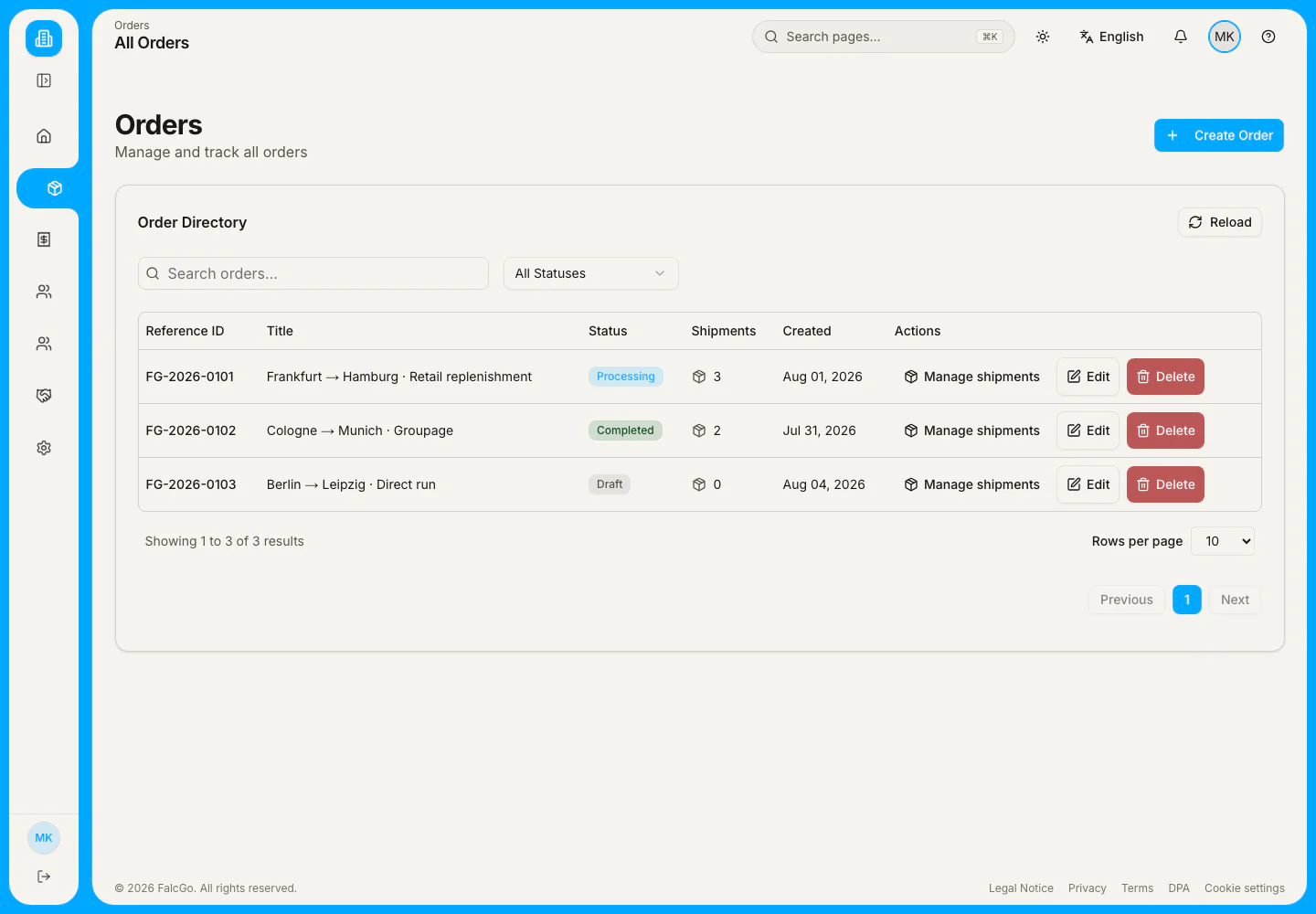
The order directory connects references, lanes, status and shipment counts. Search and status filters narrow the list; an order can then be edited or opened with all of its shipments.
Customers provide transport data. Operations structure and assign the work. Drivers report progress. Partners take over shipments. Proof comes back. When every handoff lives in a separate channel, the shared operational history disappears.
One shipment. Multiple roles. One shared history.Each step adds context, responsibility and proof to the same operation.
Create the transport internally or invite a customer into a purpose-specific self-booking flow.
Capture addresses, time windows, contacts, references, packages and weights.
Choose your own driver, hand it to an accepted partner or leave assignment open.
Keep statuses, actual events and assignments in one operational history.
Record delays or problems with a reason, action and follow-up state.
Capture POD documents, photos and signatures where the workflow enables them.
Create individual or collective invoices from eligible shipments and maintain payment status.
Every view comes from the current platform and uses controlled demo data—not recreated UI mockups or customer evidence.
Actual product view · synthetic demo dataNot every role needs the same interface. They do need the right shipment context.
Keep orders, teams, partners, exceptions and invoicing in operational context.
Create and manage transport work, coordinate execution and resolve change.
Work on assigned shipments and report progress through the intended status flow.
Review forwarded work, accept or reject it and assign their own drivers.
Submit requested data or open purpose-specific tracking, POD and invoice links.
Dispatch selects an already accepted partner company and forwards the shipment with its lane, time windows and optional agreed price and note. The partner makes its own decision, assigns an own driver after acceptance and updates execution. Status, assignment and history remain visible on the same operation.
Dispatch selects the partner and can add an optional price and note.
Waiting for acceptanceBoth companies confirm the relationship before any shipment can be forwarded.
Dispatch selects the partner and can add an optional price and note.
The partner reviews the context and deliberately accepts or rejects the shipment.
Only after acceptance does the partner assign one of its own active drivers.
Pickup and further allowed status updates are added to the operation.
Status, assignment and proof stay connected to the same shipment.
The FalcGo driver app on iPhone and iPad walks through the shift, pickup, delivery and proof. Every confirmation writes into the same shipment history that dispatch and the customer see later.
Actual app views · synthetic demo data

Two more views of the same app on iPhone — the part of the day the driver holds in one hand.


Five views of the driver app on iPad — in the order a driver moves through them across a working day.


Scroll or swipe horizontally to see all five views.
Delays and problems become part of shipment history with a reason, action and follow-up state. Position data appears only when it is available for that shipment.
Invite a customer to submit shipment drafts with addresses, time windows, packages and required acceptance. You review, approve or return a correction reason.
See the self-booking flowPurpose-specific links open public status views and released POD or invoice documents. Content and availability depend on the operation.
Open trackingPOD photos, documents and signatures stay connected to the shipment. Eligible shipments can then feed individual or collective invoices with editable line items, document preview, sending and payment status.
See the workflowThis calculator shows an estimate based only on your inputs. It is not a customer result or a guaranteed FalcGo saving.
(Shipments per month × (Handoffs per shipment + Manual status requests per shipment) × Minutes per request or handoff) ÷ 60FalcGo is a role-aware transport-execution workspace. It connects order and shipment, internal or partner execution, exceptions, POD and invoicing in one operational history.
Freight forwarders and transport operators working with their own operations teams, drivers and/or accepted partner companies.
A shipment is deliberately forwarded to an accepted partner company. The partner can accept or reject it, assign its own driver and update status through the intended flow.
Yes, through a purpose-specific self-booking invitation. Submitted information is reviewed before operational acceptance and can be returned for correction.
Tracking and released POD/invoice documents use purpose-specific links. A self-booking invitation may require registration.
A delay or problem is recorded with its reason, action and follow-up state. The original event remains visible in shipment history.
No. The current product provides map and route context, not universal automated tour or HGV route optimisation.
No. FalcGo connects transport data to individual and collective invoices, documents and payment status; it is not positioned as complete financial accounting.
Briefly describe how transport work moves through your operation today. We confirm receipt without inventing a response time or outcome promise.